
 Get registered and you will earn 5 points
(Each R100 spent = 1 point).
Get registered and you will earn 5 points
(Each R100 spent = 1 point).
IN STOCK at EXTERNAL supplier.
If ordered before 10AM:
DELIVERED in 2-3 business days (main centres)
or 3-5 business days (regional areas or large items)
COLLECTION from GeeWiz available in 1-2 business days

Overview Summary:
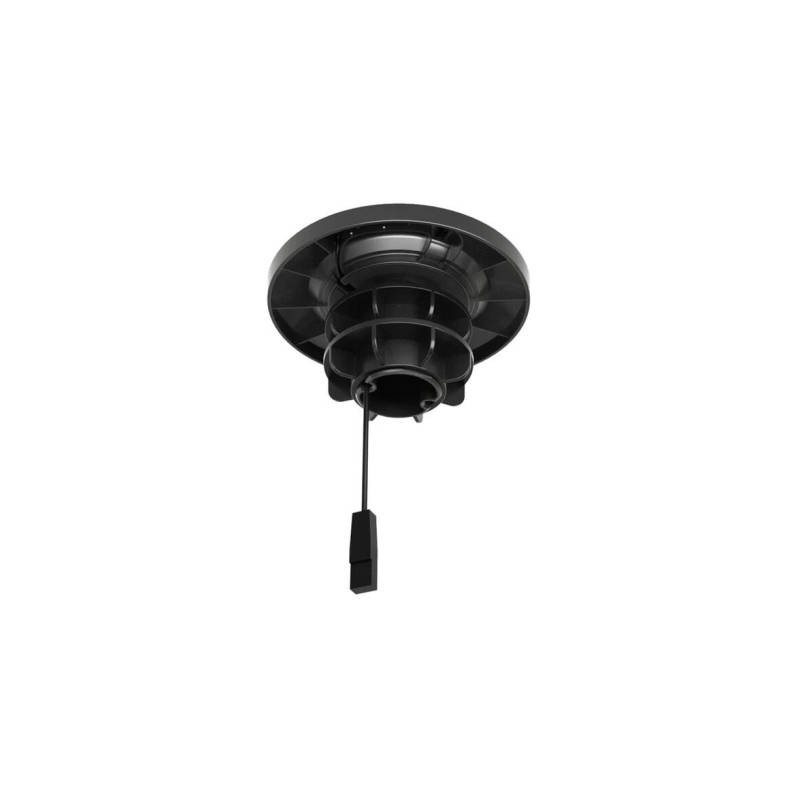
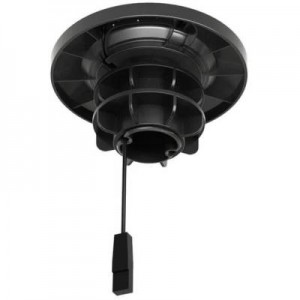
The Yealink VCM35 / VCM36 Tabletop Microphone Mount is the ideal accessory for keeping your Yealink microphones secure and stable in professional meeting environments. Designed for easy installation and long-lasting durability, this mount ensures your microphone stays in place during meetings, reducing the hassle of constant repositioning. With a quick installation process, this mount is a reliable addition to any conference room setup, offering seamless compatibility with Yealink VCM35 and VCM36 models. Buy now and improve the efficiency and organization of your meetings!
What tier does this fall into?
Premium
What is this best for?
Conference rooms, meeting spaces, professional presentations, audio setups, microphone stability solutions
Overview:
Yealink VCM35 / VCM36 Tabletop Microphone Mount
The Yealink Tabletop Microphone Mount is a practical and reliable accessory designed to securely hold Yealink microphones in place, providing an efficient solution for conference rooms and meeting spaces. This mount ensures that your microphone stays stable during use, offering a clean, professional setup without the need for complicated installations. Perfect for businesses that require high-quality audio solutions for their meetings and presentations, this mount integrates seamlessly with your existing Yealink equipment.
Features:
Key Benefits and Features:
The Yealink Tabletop Microphone Mount is crafted with durable materials to ensure long-lasting performance and stability. It is specifically engineered for tabletop use, making it an ideal addition to your conference room setup. With a straightforward installation process, this mount can be easily positioned on any flat surface, providing a clutter-free and organized space for your microphone. Whether you're using it with the VCM35 or VCM36 models, this mount enhances your microphone's functionality by keeping it securely in place during use.
Durable Construction and Stability
Made from high-quality materials, the Yealink Tabletop Microphone Mount is built to withstand the rigors of everyday use. Its sturdy design ensures that your microphone remains stable, even during extended meetings or high-volume discussions. This means less worry about accidental movements or instability, allowing you to focus on the content of your meetings rather than the positioning of your equipment.
Easy and Quick Installation
Installing the Yealink Tabletop Microphone Mount is a simple, straightforward process. There's no need for professional assistance, and no complicated tools are required. All you need is a flat surface and a few quick steps, which we detail below. The mounting process ensures your microphone is securely fixed, without any fuss or mess.
Simple Compatibility with Yealink VCM35 and VCM36
The mount is compatible with the Yealink VCM35 and VCM36 microphones, providing a stable foundation for these devices. This compatibility ensures that you can easily integrate this mount into your existing Yealink conference setup, streamlining your audio equipment and maximizing your meeting productivity.
Product Dimensions and Specifications
How to Install the Yealink Tabletop Microphone Mount
Installing the Yealink Tabletop Microphone Mount is easy and requires minimal effort. Follow these simple steps to secure your microphone mount:
Conclusion
The Yealink Tabletop Microphone Mount is the perfect solution for those looking to keep their conference room setups neat and efficient. With easy installation, solid durability, and compatibility with the VCM35 and VCM36 microphones, it offers reliable performance for any professional meeting or presentation.
Return of merchandise (RMA) and Warranty
We want you to be happy with the purchase you have made from us. If you are not completely satisfied, you may return the product to us and we will either refund, credit, repair/replace it, subject to the below terms and conditions.
You can return purchases for a refund (excl shipping). Please notify us within 7 days and ensure item is ready maximum 10 days after delivery date.
Please ensure to log your return request within 7 days of receipt of your item. Please ensure to select the correct reason for return:
- Changed my mind / Item exchange
- Faulty on arrival
- Incorrect item received
All items are covered by a 12 month warranty (unless otherwise stated) which will be honoured directly by GeeWiz. All products will either be replaced/repaired/refunded depending on stock availability. Products will require evaluation by GeeWiz before a warranty claim can be accepted.
Should the item being returned for assessment be found to be in good working order, unfortunately, there will be a collection fee that will apply.
The collection fees are as follows:
- For returns on items that were sent with free shipping: R198
- For returns that had a surcharge, the same surcharge will apply for collection.
Please log your return on your account, under the returns manager.
We do not reimburse your fee to ship to us, but we will pay for return shipping if the item is subject to replacement. If the item you wish to return was ordered incorrectly / is no longer required / you have changed your mind, there is a collection fee that will be charged (please refer to the above) and this will be deducted from the refund amount once the supplier has credited us. Please note GeeWiz will only cover return shipping of a faulty unit within 6 months of purchase, after which, a shipping fee (starting from R198) will be applicable to you for the return of the unit.
Any disputes relating to ordered items being short/incorrectly shipped will only be entertained if reported to GeeWiz within 3 days of delivery/collection.
Refunds are subject to inspection of item(s) - in some cases, items will need to be sent to supplier for evaluation and testing. This can take up to 15 working days. Once a refund has been approved, this may take 3 - 5 business days to be processed.
ALL returns are subject to up to a 30% restocking fee if item is no longer in BRAND NEW condition or if item seal/packaging has been broken.
Please re-package safely and include all original product packaging.
All software products are unfortunately not eligible for credit or refund once purchased.
After the 6-month period, you will no longer be eligible and won't be able to receive a refund. We can however replace or repair depending on the outcome after our team of professionals has inspected the product.
Should a warranty sticker not be present on an item, the warranty is immediately null and void.
Batteries are covered under warranty, but please note that GEL, AGM and LEAD ACID have limited cycle runs. These are typically around 200 cycles and may run out before the end of the warranty. Once the cycles have been depleted, it means the battery has reached the end of life and will no longer be a warranty claim.
GeeWiz reserves the right to refuse a refund if the item is damaged from misuse, items are missing, or if the product is altered in any way.
GeeWiz or its affiliates are not responsible for damage or loss of any kind that may occur as a result of using or misusing any product purchased from us.
The warranty will no longer be valid, and GeeWiz will not be responsible for damage or injury of any kind resulting from:
For hygiene purposes.
Please note we cannot accept returns for apparel that has been worn, stained, frayed, or otherwise shows signs of use.
We can only accept returns for items that are damaged upon receipt or are faulty.
Click here to get more details
If you have any further questions, please feel free to use the form below to ask:
(8 other products in the same category)