
 Get registered and you will earn 26 points
(Each R100 spent = 1 point).
Get registered and you will earn 26 points
(Each R100 spent = 1 point).
IN STOCK at EXTERNAL supplier.
If ordered before 10AM:
DELIVERED next business day (main centres)
or 3-5 business days (regional areas or large items)
COLLECTION from GeeWiz available Same Day (approx 4:30pm)

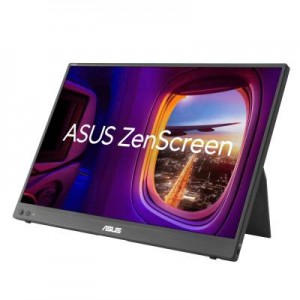
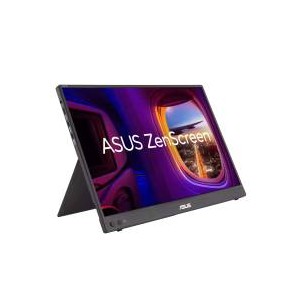
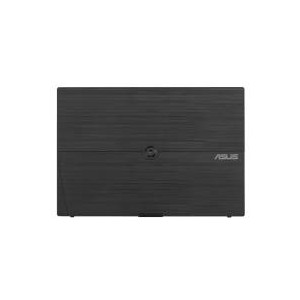
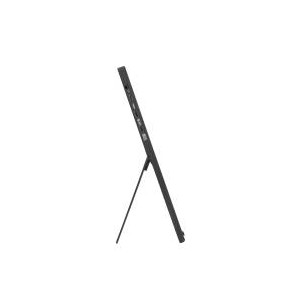
The ASUS ZenScreen MB16FC is a 16 inch portable WUXGA monitor designed for productivity, travel, and flexible multi-screen setups. Featuring a 1920 x 1200 IPS display, 75Hz refresh rate, USB-C connectivity, and mini HDMI support, this lightweight portable monitor delivers clear visuals and smooth performance for work or entertainment. Buy online today for quick delivery in South Africa and improve your mobile workspace.
The ASUS ZenScreen MB16FC is a slim and lightweight portable monitor built for professionals, students, creators, and remote workers who need an additional display on the go. Its 16 inch WUXGA IPS panel delivers sharp image quality with a 16:10 aspect ratio that provides more vertical workspace than standard Full HD portable displays. The anti-glare screen and ASUS Eye Care technologies help reduce eye strain during extended use.
This portable monitor supports USB-C with DisplayPort Alt Mode and mini HDMI connectivity, making it compatible with many laptops, desktops, gaming consoles, and mobile devices. The integrated power pass-through feature supports up to 65W charging, helping reduce cable clutter while maintaining productivity. With auto rotation support, tripod socket compatibility, and an ultra-portable design, the ZenScreen MB16FC is suitable for travel, hybrid work, presentations, and entertainment.
What tier does this fall into?
Premium portable productivity monitor
What is this best for?
Remote work, dual-screen productivity, business travel, presentations, gaming consoles, content viewing, office work, mobile workstation setups
Overview
ASUS ZenScreen MB16FC is a 16-inch portable IPS monitor featuring a WUXGA (1920 x 1200) resolution. This 16:10 display provides more viewing area, making it the ideal secondary display to extend workspace for hybrid workers. With autorotation feature, giving ZenScreen the versatility to be used in either landscape or portrait orientation. Also, with power pass-through feature and USB-C ports, you can have two-way power delivery function that offers flexibility on the go.
Quick Specifications:
Screen size: 16 inches
Flat or curve: Flat portable monitor
Panel type: IPS
Aspect ratio: 16:10
Resolution: 1920 x 1200
Refresh rate: 75Hz
Brightness (nits): 300 nits
Contrast ratio: 1000:1
View angle (degrees): 178 degrees
Response time (ms): 5 ms
Frequency (Hz): 75 Hz
Sync: Adaptive Sync
Video ports: 2 x USB-C, 1 x mini HDMI
VESA: -
What tier does this fall into?
Premium portable productivity monitor
What is this best for?
Business travel, remote work, mobile productivity, presentations, console gaming, content viewing
Strong reasons to buy
Description
The ASUS ZenScreen MB16FC is engineered for users who require a portable second screen without compromising image quality or functionality. Its ultra-slim profile and lightweight chassis make it suitable for professionals working remotely, travelling frequently, or setting up temporary workstations. The compact form factor fits easily into backpacks and laptop bags while remaining durable enough for daily use.
The 16 inch IPS display uses a WUXGA 1920 x 1200 resolution with a 16:10 aspect ratio, giving users additional vertical screen space for productivity applications such as spreadsheets, coding, browsing, and document editing. The anti-glare coating improves visibility in bright environments while maintaining sharp detail and colour consistency.
Connectivity includes dual USB-C ports with DisplayPort Alt Mode support and a mini HDMI input, allowing compatibility with modern laptops, desktops, gaming consoles, and compatible smartphones. The integrated 65W power pass-through functionality enables convenient charging setups while using the monitor through a single USB-C connection on supported devices.
Additional productivity features include auto screen rotation through ASUS DisplayWidget software, low blue light technology, flicker-free certification, and a built-in tripod socket for flexible positioning. Whether used for business presentations, remote office work, or entertainment, the ZenScreen MB16FC provides a practical and portable display solution.
Features
The ASUS ZenScreen MB16FC combines portability, productivity, and flexible connectivity in a compact monitor designed for modern mobile workflows.
More immersive
Brings you a stunning 16:10 display that's both wider and more vibrant, supporting up to 1920x1200 resolution and an impressive 84% screen-to-body ratio. Enjoy an expansive, vivid view all packed into a sleek, lightweight extended portable monitor.
Power pass through
There is the two-way power delivery function built in. The MB16FC portable monitor can be powered by a laptop, or deliver power to a laptop via pass-through charging when plugged into a USB-C power bank or AC adapter and outlet*.
One cable is all you need
MB16FC features rich connectivity with dual USB-C and mini-HDMI ports. A single USB-C cable* is all you need to duplicate or extend your laptop screen. USB-C handles both power and video signal transmission, so it's simply a matter of plug-and-play when it's time to level up your work efficiency.
Automatic screen orientation
When connected to a Windows PC, the ASUS DisplayWidget Center tool* enables MB16FC to sense its orientation and automatically switches the display between landscape and portrait modes.
ASUS Eye Care
ASUS Ultra-Low Blue Light technology reduces potentially harmful blue light emissions and includes additional features that are beneficial to those who spend long hours in front of a display.
ASUS Blue Light Filter
The ASUS Blue Light Filter protects viewers from harmful blue light. This feature offers a range of filter settings that are easy to access via the intuitive OSD menu. ZenScreen MB16FC has passed stringent performance tests and is certified by TÜV Rheinland laboratories, a global provider of technical, safety, and certification services.
ASUS Flicker Free
TÜV Rheinland-certified ASUS Flicker Free technology eliminates flicker, ensuring comfortable viewing experiences. This technology helps minimize eyestrain and other ailments typically associated with extended hours of viewing.
What's in the Box

Return of merchandise (RMA) and Warranty
We want you to be happy with the purchase you have made from us. If you are not completely satisfied, you may return the product to us and we will either refund, credit, repair/replace it, subject to the below terms and conditions.
You can return purchases for a refund (excl shipping). Please notify us within 7 days and ensure item is ready maximum 10 days after delivery date.
Please ensure to log your return request within 7 days of receipt of your item. Please ensure to select the correct reason for return:
- Changed my mind / Item exchange
- Faulty on arrival
- Incorrect item received
All items are covered by a 12 month warranty (unless otherwise stated) which will be honoured directly by GeeWiz. All products will either be replaced/repaired/refunded depending on stock availability. Products will require evaluation by GeeWiz before a warranty claim can be accepted.
Should the item being returned for assessment be found to be in good working order, unfortunately, there will be a collection fee that will apply.
The collection fees are as follows:
- For returns on items that were sent with free shipping: R198
- For returns that had a surcharge, the same surcharge will apply for collection.
Please log your return on your account, under the returns manager.
We do not reimburse your fee to ship to us, but we will pay for return shipping if the item is subject to replacement. If the item you wish to return was ordered incorrectly / is no longer required / you have changed your mind, there is a collection fee that will be charged (please refer to the above) and this will be deducted from the refund amount once the supplier has credited us. Please note GeeWiz will only cover return shipping of a faulty unit within 6 months of purchase, after which, a shipping fee (starting from R198) will be applicable to you for the return of the unit.
Any disputes relating to ordered items being short/incorrectly shipped will only be entertained if reported to GeeWiz within 3 days of delivery/collection.
Refunds are subject to inspection of item(s) - in some cases, items will need to be sent to supplier for evaluation and testing. This can take up to 15 working days. Once a refund has been approved, this may take 3 - 5 business days to be processed.
ALL returns are subject to up to a 30% restocking fee if item is no longer in BRAND NEW condition or if item seal/packaging has been broken.
Please re-package safely and include all original product packaging.
All software products are unfortunately not eligible for credit or refund once purchased.
After the 6-month period, you will no longer be eligible and won't be able to receive a refund. We can however replace or repair depending on the outcome after our team of professionals has inspected the product.
Should a warranty sticker not be present on an item, the warranty is immediately null and void.
Batteries are covered under warranty, but please note that GEL, AGM and LEAD ACID have limited cycle runs. These are typically around 200 cycles and may run out before the end of the warranty. Once the cycles have been depleted, it means the battery has reached the end of life and will no longer be a warranty claim.
GeeWiz reserves the right to refuse a refund if the item is damaged from misuse, items are missing, or if the product is altered in any way.
GeeWiz or its affiliates are not responsible for damage or loss of any kind that may occur as a result of using or misusing any product purchased from us.
The warranty will no longer be valid, and GeeWiz will not be responsible for damage or injury of any kind resulting from:
For hygiene purposes.
Please note we cannot accept returns for apparel that has been worn, stained, frayed, or otherwise shows signs of use.
We can only accept returns for items that are damaged upon receipt or are faulty.
Click here to get more details
If you have any further questions, please feel free to use the form below to ask:
(8 other products in the same category)